QIFConvert for Windows
What is QIFConvert for Windows?
QIFConvert for Windows is a convenient free utility that imports accounts data, which have been exported from a personal accounting app , to a .qif file, converts them and saves them as a .mnw file for opening in MyNetWorth for Windows. It aims to assist current users of category-based finance and accounting apps (such as Microsoft Money), who want to exploit the benefits of full double entry bookkeeping, to migrate to MyNetWorth for Windows.
QIFConvert for Windows is simple and easy to use. The most complicated aspect of migrating from category-based finance and accounting apps to MyNetWorth for Windows is exporting the QIF datafile, which needs to be done with care. However, clear instructions can be found in the QIFConvert for Windows User Guide.
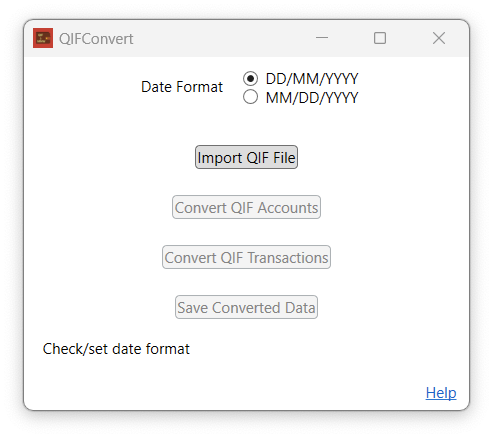
Once the QIF data has been exported, converting them to the MyNetWorth for Windows format involves the following steps:
- The first task is to select the appropriate date format for the QIF file to be imported by selecting the appropriate radio button. Once you have selected the appropriate date format, click on the Import QIF File button to import your exported data.
- With your QIF file successfully uploaded into QIFonvert you can convert your QIF data into the MyNetWorth for Windows compatible format. Simply click on the Convert QIF Accounts button.
- If your QIF Accounts data are converted successfully, you have the option to save just your QIF Accounts Tree into MyNetWorth for Windows format or to go on to convert your QIF Transactions. Simply click on the Convert QIF Transactions button or the Save Converted Data button.
- With your QIF data successfully converted into a MyNetWorth for Windows compatible format you can save them to the .mnydata file that you will be able to open with MyNetWorth for Windows. Simply click on the Save Converted Data button, navigate to the directory where you want to save the converted data file, select or name the file and click on the Save button.
You will now be able to launch MyNetWorth for WIndows, open your imported accounts and continue to manage your personal finances, using double entry bookkeeping methods.
If you are ready to download QIFConvert for Windows now, please click on the link below:

Created with Ignite
© 2022 - 2026 Christopher Hull. All rights reserved.