Synchronisation between MyNetWorth and iNetWorth
22/10/2024; 292 words; 2 minutes to read.
Please note that iCloud synching from iOS to macOS devices is occasionally delayed. If you are not prompted to upload an updated file when you run MyNetworth, but you know that you have edited your file in iNetWorth, please check whether your iCloud drive has been synchronised since you edited your file in iNetWorth. Just click on the symbol that appears, when you hover your mouse over the iCloud Drive entry in the Finder app’s Sidebar. A bubble will appear, showing when your iCloud drive was last synchronised.
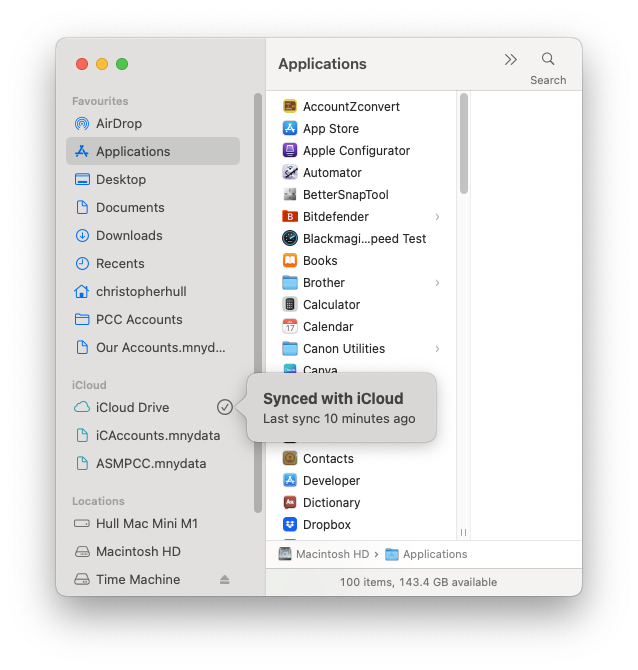
If your iCloud drive hasn’t been synchronised since you completed your update, please just wait a bit. Your iCloud drive should synchronise automatically, usually after a minute or two as long as your are connected to the internet. If it does synchronise, quit and restart MyNetWorth (rejecting any changes); the prompt to upload your updated file will appear. If, however, your iCloud drive fails to synchronise after a reasonable wait (and you have confirmed that you are connected to the internet), you can try encouraging it, using Howard Oakley’s Cirrus app, which can be found at https://eclecticlight.co/cirrus-bailiff/.
If you would like to know much more about iCloud synchronisation issues, I recommend you go to https://eclecticlight.co/2021/12/03/what-to-do-when-icloud-gets-stuck/.
Created with Ignite
© 2022 - 2026 Christopher Hull. All rights reserved.