Improvements to Schedule View in MyNetWorth and iNetWorth
17/07/2025; 583 words; 3 minutes to read.
MyNetWorth, MyNetWorth for Windows and iNetWorth have all been updated to Version 3.0 recently. Amongst other improvements (such as introducing “stickiness” into the dialogue boxes of MyNetWorth and iNetWorth for editing transactions in the Accounts, Payees and Schedule Views, where switching between normal and split transactions now restores any entries that have been made thus far)1 some important changes have been made to the Schedule View.
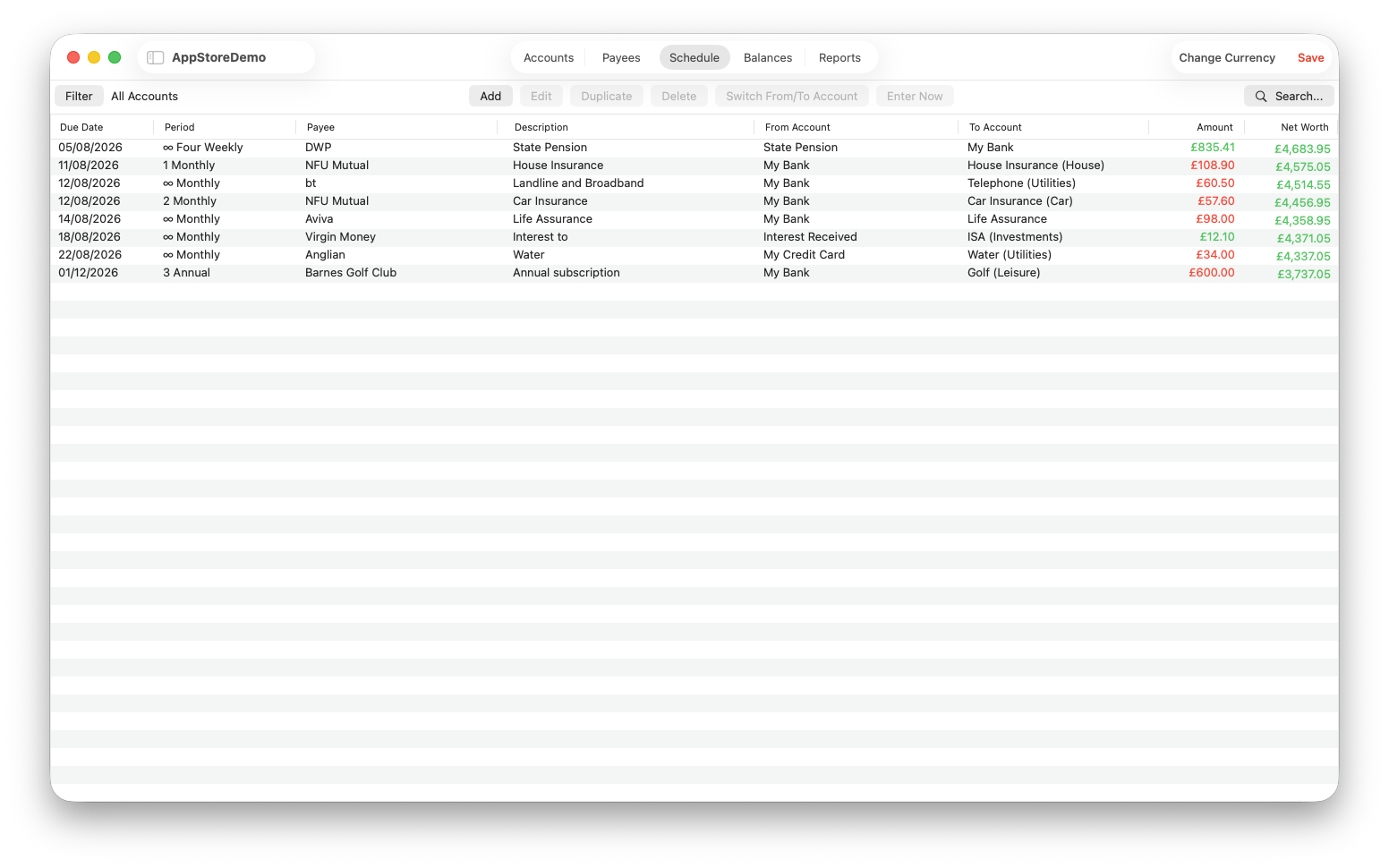
The Schedule View now displays future Net Worth / Balance values and it uses colour to highlight whether a scheduled transaction will increase Net Worth / Balance, in which case its amount is shown in green, or decrease it, in which case its amount is shown in red. Furthermore, the Net Worth / Balance column is also colour coded (in green if the Net Worth / Balance is positive, after the scheduled transaction has been completed, or red, if it becomes negative). This last improvement should help users detect any risks of accounts going overdrawn in the future. The amount figures for Transfer transactions, which do not change Net Worth, are always shown in the normal system text colour, rather than in green or red.
The contents of the Net Worth / Balance column depend on whether or not the Schedule View account filter is set. If it is not, the Net Worth / Balance column shows future Net Worth. If the account filter is set, the table contents are limited to transactions that are made from or to the selected account and the Net Worth / Balance column then shows the future balance of the selected account. The title of the Net Worth / Balance column changes to show which figures it is displaying, Net Worth or Balance.
MyNetWorth, MyNetWorth for Windows and iNetWorth now provide the user with ready access to Net Worth values over time: Current Net Worth is displayed in the Balances View; historical Net Worth values are displayed in the Reports View, when no filters are set; and future Net Worth values are displayed in the Schedule View, when no account filter is selected.
I would be interested in your views on the use of colour in transaction tables. iNetWorth has used colour coding in the Accounts View for a long time now. MyNetWorth and MyNetWorth for Windows have not used it in the Accounts View, because the Accounts View transactions table has separate From and To Account columns, so it is fairly obvious whether a transaction is a debit or a credit. Please let me know, by dropping an email to chris@crizzle.co.uk, whether you would like to see more use of colour. Would you like to see it used in the Accounts View in MyNetWorth and MyNetWorth for Windows? Would you like to see it used in the Payees and/or Reports Views of all three apps?
1MyNetWorth for Windows has always had this capability.
Created with Ignite
© 2022 - 2026 Christopher Hull. All rights reserved.